Win More Bids
No more unsigned
change orders
Create a change order, send it to the client, and get a digital signature — all before the crew starts the extra work. Every scope change documented, approved, and timestamped.
VIDEO PLACEHOLDER
Change Orders walkthrough · ~2 min
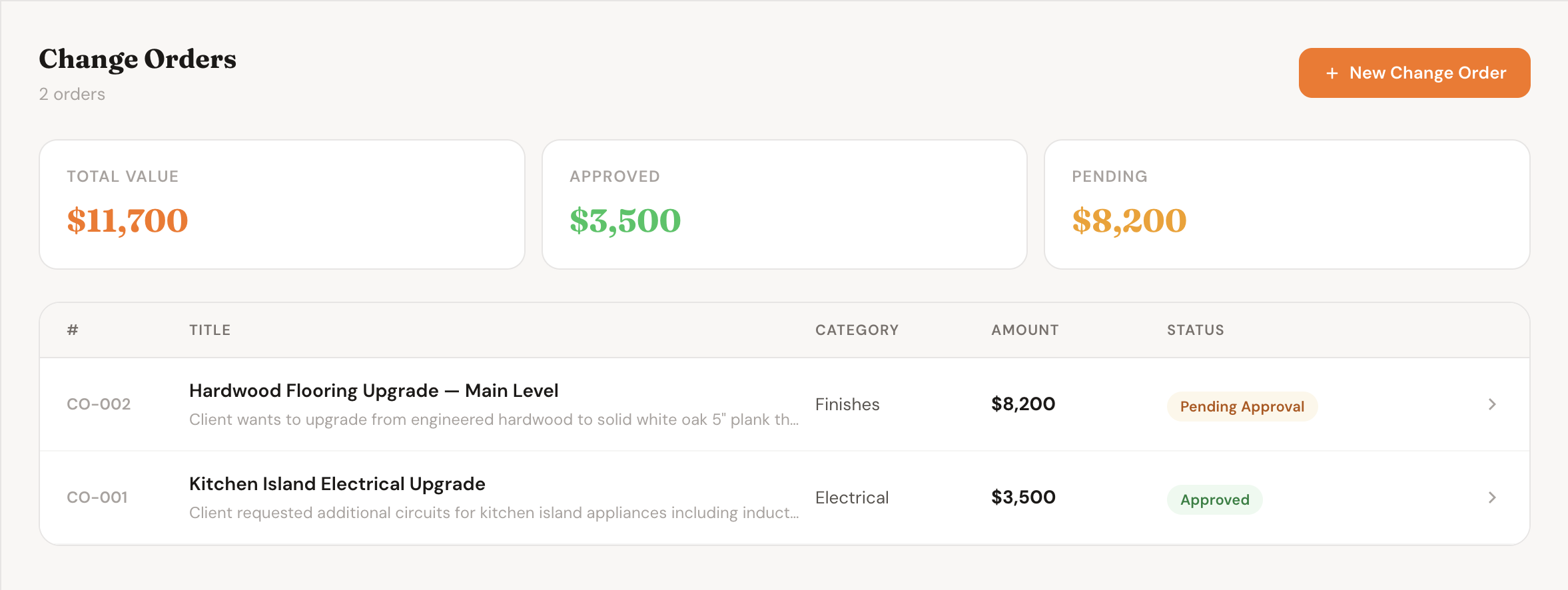
Every change order on the project — status, amount, and approval history in one view
How It Works
From scope change to signed approval
Four steps from discovering extra work to having a signed, timestamped record of it.
1
Create the change order
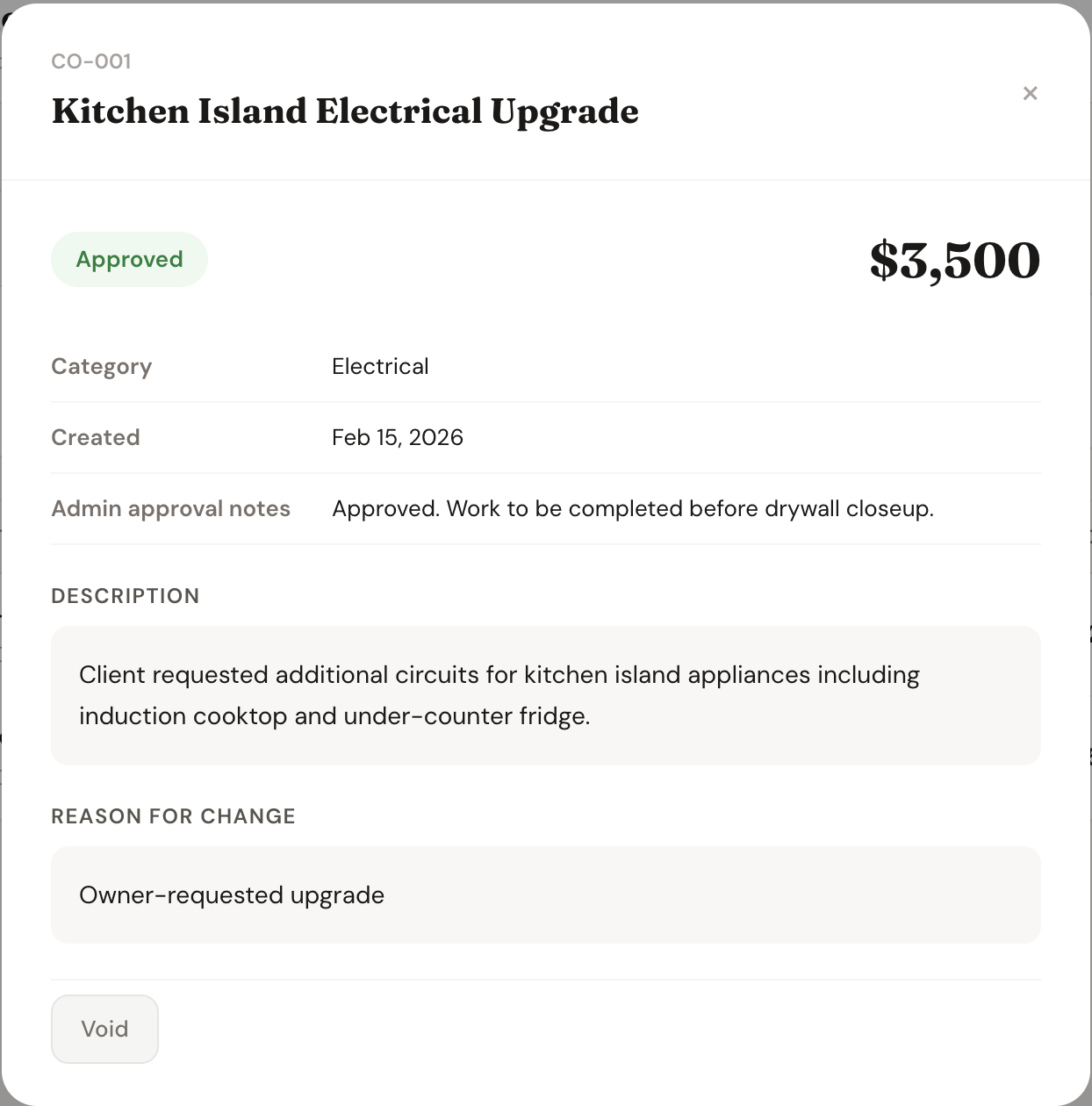
Add a description, reason, and dollar amount. Attach photos or files to document exactly what changed and why.
2
Send to the client
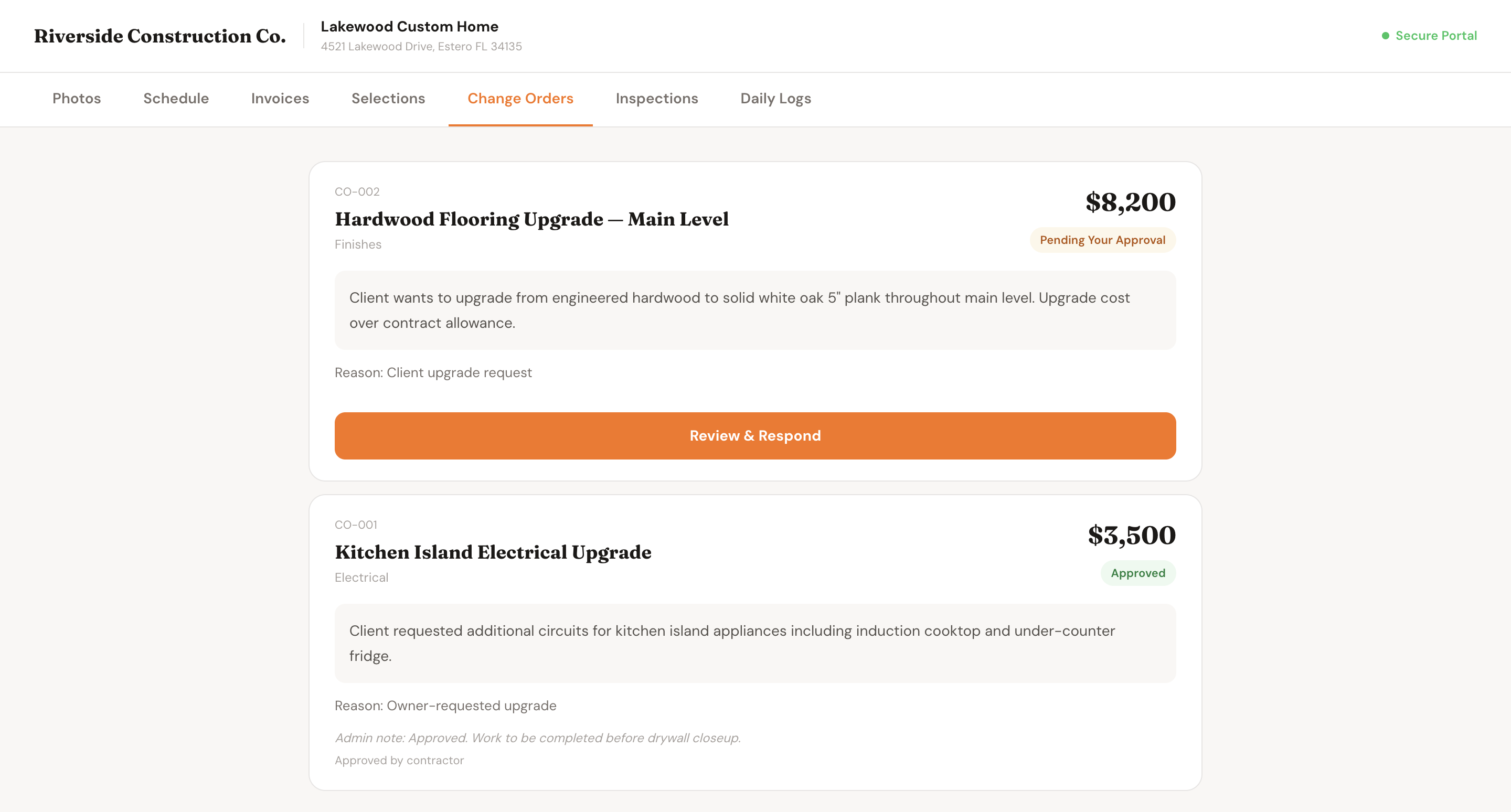
One click sends the client a link to review the change order. No app required — they open it on any device.
3
Client approves or rejects
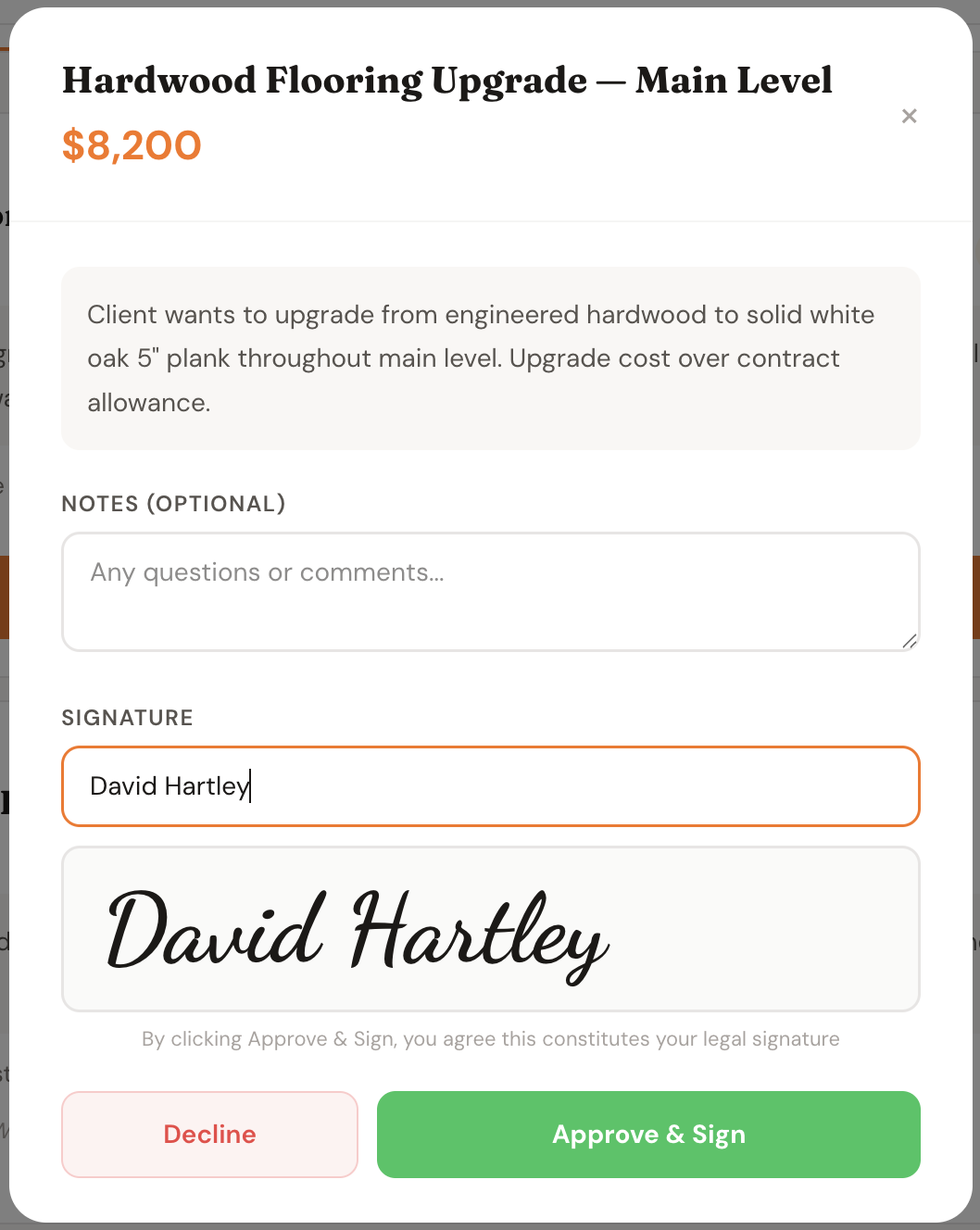
The client reviews the scope and cost, leaves a comment if needed, and approves or rejects with a tap.
4
Budget updates automatically
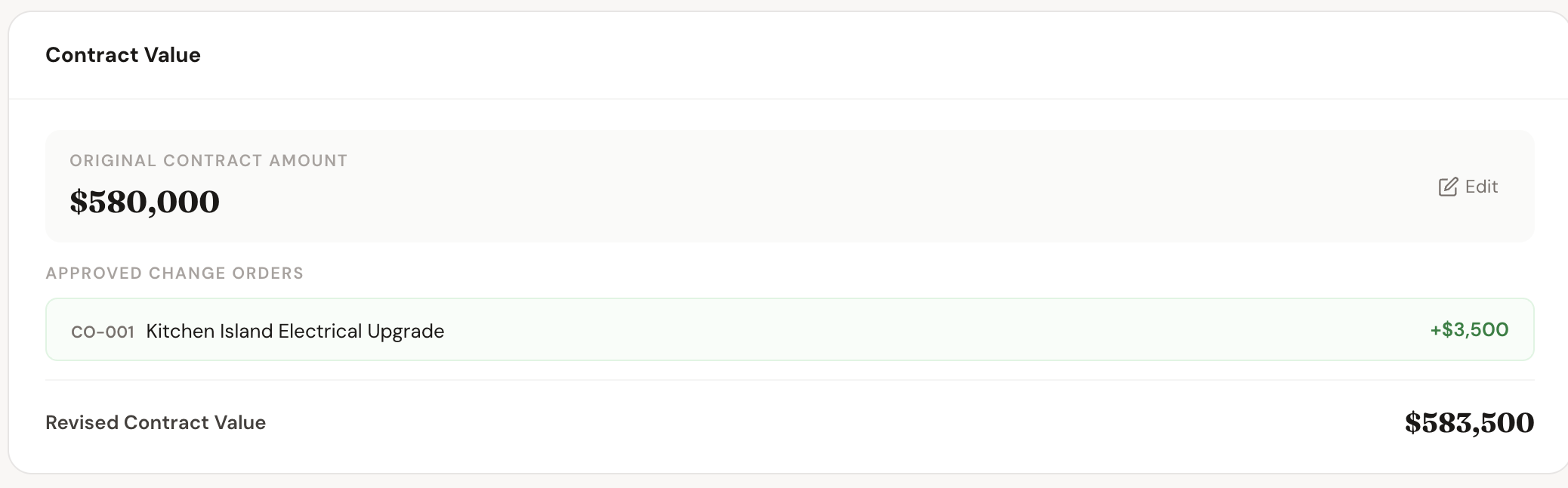
Approved change orders roll into the project's contract value instantly. The budget always reflects reality.
The Full Flow
Create it, send it, get it approved
Features
Everything you need to protect your margin
Digital Approvals
Clients approve or reject change orders with a single tap from their phone. No printing, no scanning, no back-and-forth over email.
Timestamped Records
Every approval and rejection is locked with a timestamp and the client's identity. Dispute-proof documentation for every scope change.
Automatic Budget Updates
Approved change orders add to the contract value instantly. Your project budget always shows the real number — original contract plus approved changes.
Photo & File Attachments
Attach photos, drawings, or documents to any change order. Give the client full context before they approve so there are no surprises later.
Client Portal Integration
Change orders appear directly in the client's portal alongside daily logs and project updates. One place for everything — no separate links to manage.
Status Tracking
See every change order's status at a glance — Pending, Approved, or Rejected. Filter by status to know exactly what's waiting for a decision.
Why It Matters
Unsigned change orders cost contractors thousands
Every undocumented scope change is a potential dispute — timestamped approvals eliminate the argument before it starts
Clients approve from their phone in seconds — no waiting days for a signature while the crew sits idle
Approved changes roll into your budget automatically — no manual updating, no numbers getting out of sync
The full change order history lives on the project — pull it up instantly if a client questions an invoice
Seconds
For a client to approve from their phone
Zero
Unsigned change orders slipping through
Instant
Budget update the moment an order is approved
Full history
Every change order on the project, permanently stored
Who It's For
Built for contractors who can't afford surprises
Custom Home Builders
Large projects mean frequent scope changes. Get every one documented and approved before work starts — protect your margin on every line.
Remodelers & Renovators
Remodels always uncover unexpected work. Create a change order on-site from your phone and have it approved before you call back the next day.
General Contractors
Managing multiple subs means tracking changes across projects. Keep everything in one place so nothing slips through the cracks.
Specialty Trades
Extra work added on-site is where margins disappear. A 30-second change order sent from the job protects you every time.
FAQ
Common questions
Does the client need an account to approve?
No. The client receives a link and approves or rejects directly in their browser — no account, no app, no password required.
Is the approval legally binding?
Yes. Approvals are timestamped with the client's identity and device info, meeting the requirements of the ESIGN Act and equivalent legislation.
Can I attach photos to a change order?
Yes. You can attach photos, drawings, or any supporting files to give the client full context before they approve.
What happens to the budget when a change order is approved?
The approved amount is automatically added to the project's contract value. Your budget updates instantly with no manual entry required.
Can clients reject a change order?
Yes. Clients can reject with a tap and leave a comment explaining why. You'll see the rejection and reason immediately in the project.
Can I create change orders from my phone on-site?
Yes. The full change order workflow works on any device — create, send, and track approvals from the field without needing a desktop.
Related Features
Change orders work best with
Proposals
Win the job with branded proposals clients sign digitally — the foundation before any change orders come up.
Learn more
Daily Logs
Document the work that triggered a change order with photo-rich daily logs submitted from the field.
Learn more
Inspections
Track inspection results and re-inspections — often the source of unexpected scope changes.
Learn more
Get Started
Stop doing free work
Every undocumented scope change is money left on the table. Start creating change orders from the field and get approvals before the work starts.