Back to SiteBridge.Pro·Feature Deep Dive

Close deals before your
competition sends a quote

Track every lead from first inquiry to signed contract. Build polished, branded proposals in minutes, send clients a signing link, and get digital signatures — all without chasing paper or managing spreadsheets.
Start winning more bids
VIDEO PLACEHOLDER
Sales Pipeline walkthrough · ~2 min
app.sitebridgepro.com/dashboard/pipeline
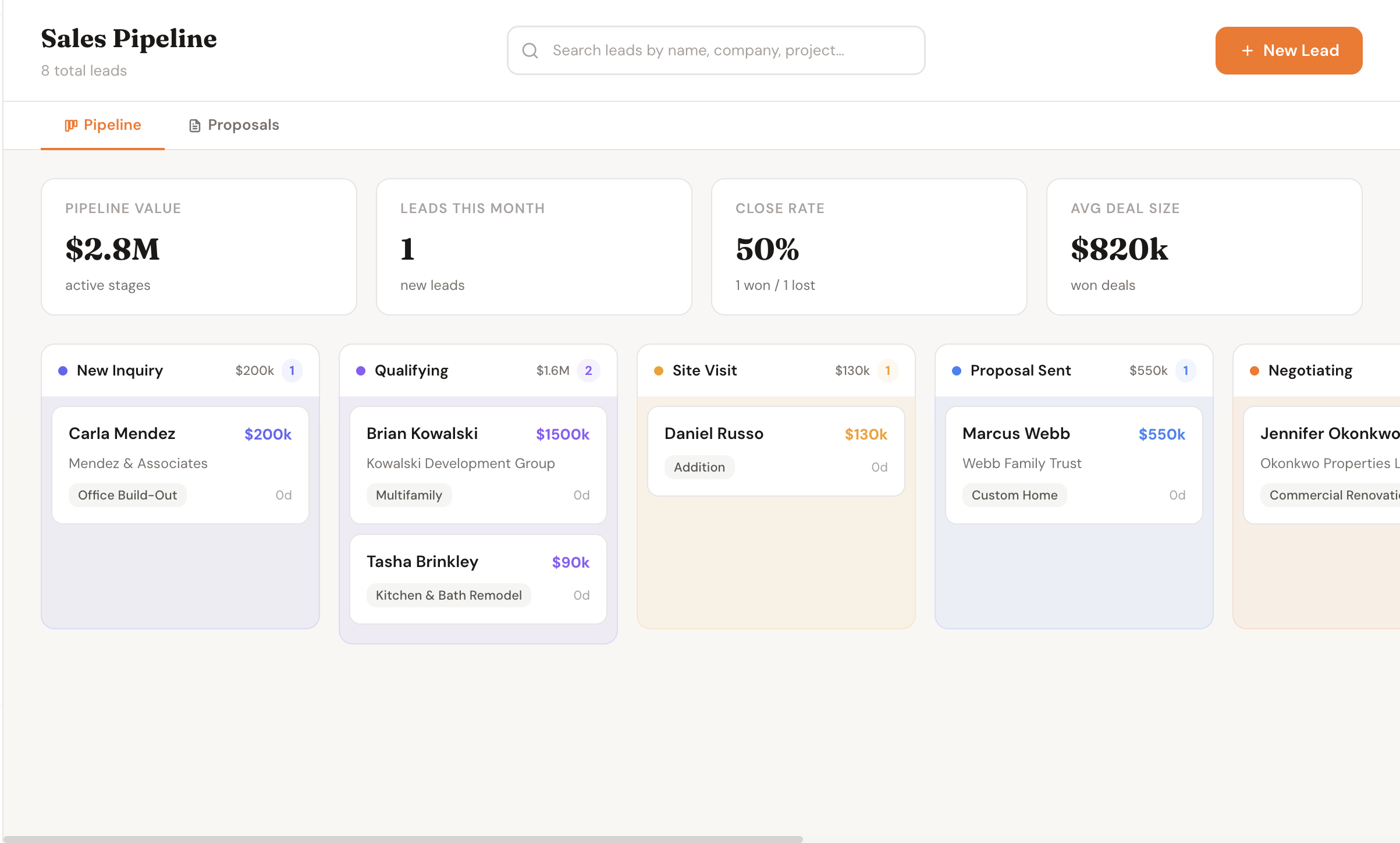
Sales pipeline kanban board showing leads across stages from new inquiry to signed contract

Every lead in one view — stage, value, and next steps at a glance

From first call to signed contract in one tool

No more sticky notes, spreadsheets, or chasing leads through your email inbox.

1

Lead comes in — add it in 30 seconds

A homeowner calls or emails. You add them to the pipeline: name, contact, job type, rough scope. Drag them to the right stage. It takes under a minute, and nothing falls through the cracks again.

2

Build a polished proposal in minutes

Open the proposal builder, add your line items, apply your markup, and your company logo and colors go on automatically. No Word templates, no reformatting. Looks professional every single time.

3

Client signs on their phone

Send the client a link. They open it on any device — no account, no app. They review the scope and price, enter a PIN, and sign. You get notified instantly. The signed document is stored on the job.

4

Lead becomes a project automatically

Once the proposal is signed, you convert the lead to a project with one click. The scope, client info, and signed contract carry over — no re-entering anything. Your project starts with a clean record from day one.

Every step of the sales process, in one place
…/pipeline/lead/tasha-brinkley
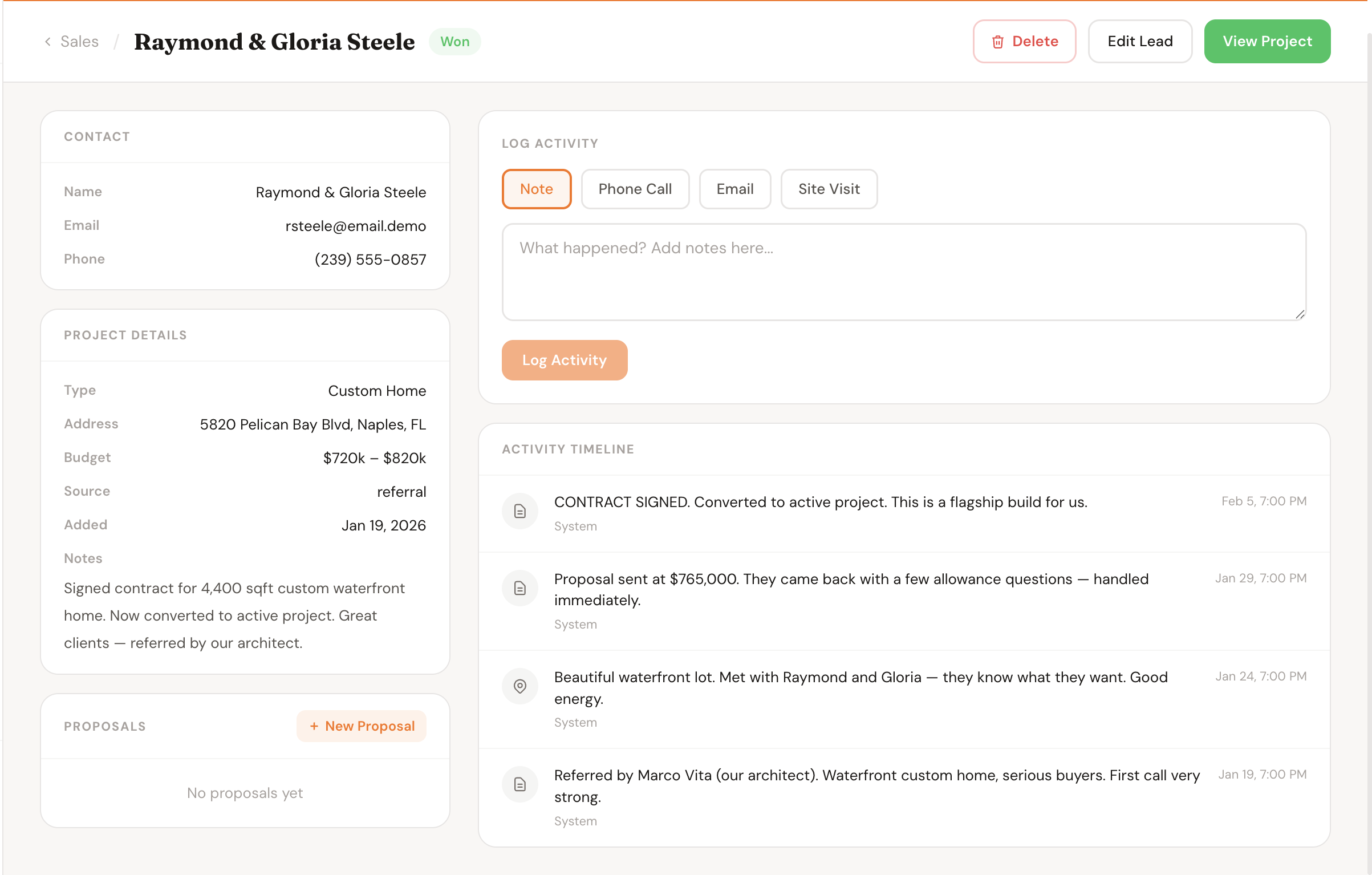
Lead detail view showing contact info, job scope, notes, and activity timeline
Lead Detail
Full contact info, job scope, internal notes, and a complete activity log — everything about this lead in one place.
…/pipeline/lead/tasha-brinkley/proposal
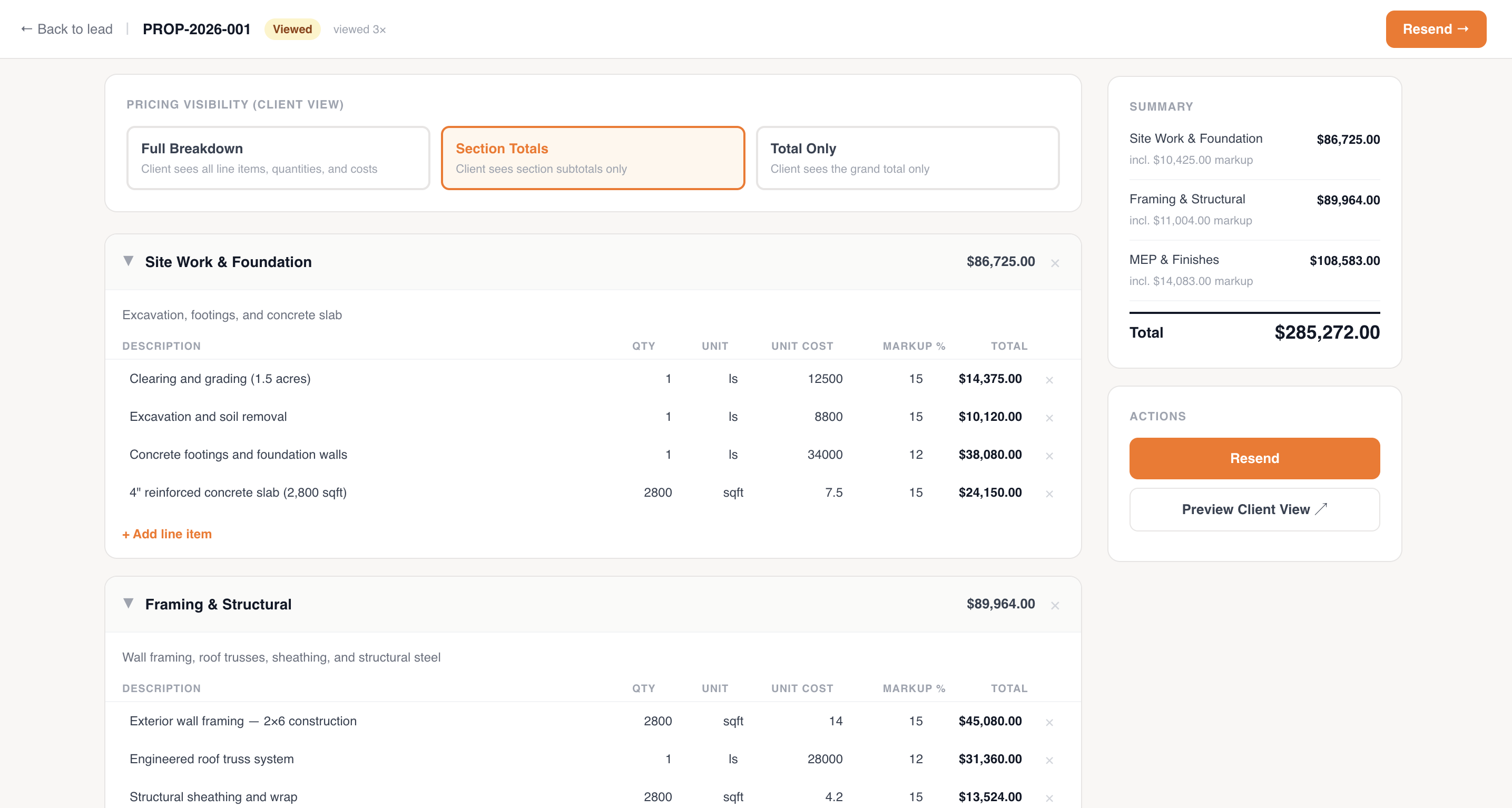
Proposal builder with line items, costs, markup, and branded header
Proposal Builder
Add line items, set your markup, and preview the branded PDF your client will see — all before you hit send.
proposals.sitebridgepro.com/p/abc123 — client view
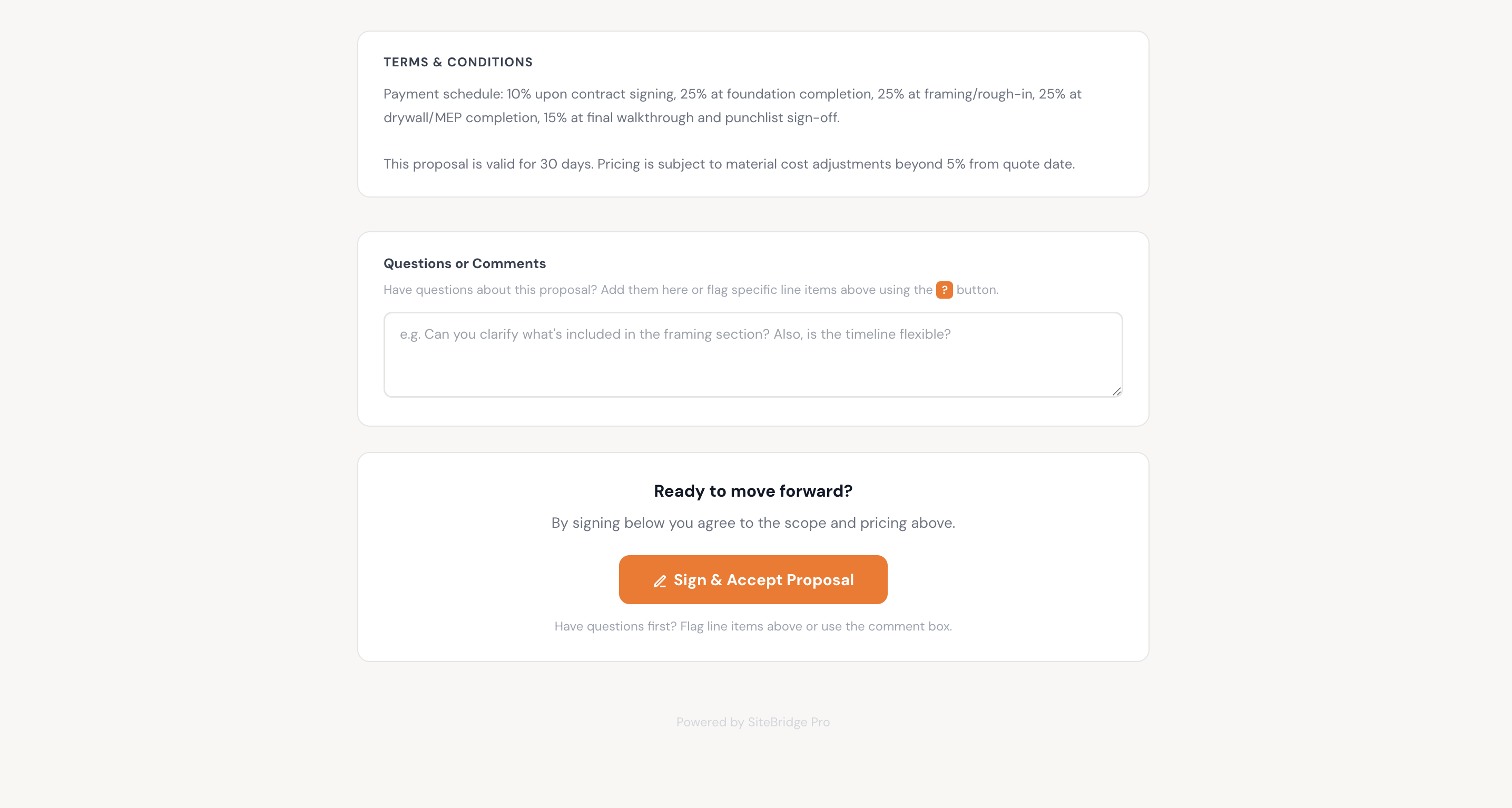
Client-facing proposal signing page showing scope, price, and digital signature input
Client Signing Page
What your client sees. No account needed — they open the link, review, and sign on any device.
Signed & Stored

Everything your sales process needs

Kanban Pipeline View

See all your active leads at once, organized by stage. Drag cards from New Lead → Contacted → Proposal Sent → Contract Signed. The total pipeline value updates automatically so you always know what's in the funnel.

Drag-and-drop stage updates
Total pipeline value shown per stage
Filter by job type, lead source, or date
Color-coded by urgency and value

Lead Detail Page

Every lead has its own page: contact info, job address, scope description, internal notes, and a full activity log showing every interaction. When you pick up the phone, you have the full picture in front of you.

Contact info, address, job type in one place
Internal notes visible to your whole team
Activity log: calls, emails, proposal sends
Attach files and photos to the lead

Branded Proposal Builder

Build line-item proposals directly in SiteBridge. Add costs, quantities, and descriptions. Set your markup percentage — or per line. Your company name, logo, and colors are applied automatically. Preview the PDF before sending.

Line-item breakdown with quantities and unit costs
Markup applied per-line or as a total
Your logo and brand colors on every proposal
Preview before sending — no surprises

Digital Signatures

Send a signing link. Your client opens it in their browser — no DocuSign account, no app download. They review the full proposal, enter a PIN, and sign. You get an instant notification. The signed contract is stored on the project permanently.

Client signs in browser — no account or app needed
PIN-verified signature for legal validity
Instant notification when signed
Signed PDF stored on the project forever

Change Orders

Scope changed after the contract was signed? Issue a change order in the same system. The client gets a link, reviews the added scope and cost, and signs digitally. Every change order is tied to the original project — no unsigned work ever leaves the office.

Same signing flow as original proposals
Tied directly to the project record
Cumulative contract value updates automatically
Never do work without a signed change order again

Pipeline Visibility

See your total pipeline value, how long leads typically sit in each stage, and your close rate over time. Know which lead sources bring in the best jobs. Make decisions based on data, not gut feeling.

Total pipeline value by stage
Average time from inquiry to signed contract
Close rate tracking over time
Lead source and job type breakdown

Speed wins bids. Professionalism keeps clients.

The contractor who responds first has an enormous advantage. Most homeowners contact three companies — the one that calls back quickly and sends a clean proposal the same day wins more than their fair share.

A polished, branded proposal tells clients you run a professional operation before the work even starts. It sets expectations clearly, reduces disputes later, and makes you look like someone worth trusting with a $200k remodel.

Respond same day
Every lead logged immediately — nothing sits in your memory or inbox.
Send proposals in minutes
Line items are templated, markup is saved, branding is automatic.
No chasing paper
Digital signing means you know when it's signed — no more "did they get it?"
Protect your scope
Signed change orders on every addition — no more "that was supposed to be included."
Close rate clarity
Know your numbers. Know where you lose deals. Improve over time.
Same day
Top contractors send proposals the same day a lead comes in — before the competition has called back
3 bids
The average homeowner gets 3 proposals. The most professional one wins, even if it's not the cheapest
0 paper
Every proposal and change order signed digitally — stored permanently, always retrievable
One click
Convert a signed proposal directly into a project — no re-entering scope, client info, or contract value

Built for contractors who sell every day

General Contractors
Manage leads across multiple job types and send proposals that reflect the size and professionalism of your operation.
Specialty Contractors
Send clean, itemized proposals that show exactly what's included. Get signatures before any work starts.
Home Builders
Manage the full pre-construction sales process from first inquiry through signed contract — and link directly to project management.
Estimators
Build and send proposals without waiting on design templates. Reuse line items across similar jobs to bid faster.

Common questions

Does the client need a SiteBridge account to sign?
No. Clients receive a link and open it in any browser — phone, tablet, or desktop. They don't create an account or download anything. They review the proposal and sign with a PIN. It's intentionally simple so there's no friction between them and the signature.
Are digital signatures legally binding?
Yes. PIN-verified digital signatures are legally enforceable under the ESIGN Act (US) and equivalent laws in most countries. For high-value contracts, we still recommend your attorney review your standard terms — but the signature itself is valid.
Can I use my own proposal templates?
You can build reusable line item templates for jobs you bid regularly. Your company branding — logo, colors, name — is applied automatically to every proposal. Custom proposal templates with your specific sections are on the roadmap.
How does a lead become a project?
Once a proposal is signed, you click "Convert to Project" from the lead detail page. The client info, signed contract, job address, and scope notes all carry over automatically. You don't re-enter anything — the project starts with a complete pre-construction record.
Can I track where my leads come from?
Yes. You can tag each lead with a source (referral, Google, yard sign, past client, etc.) and over time see which sources bring in the highest-value or most-closeable jobs. This helps you decide where to focus your marketing.
What happens to lost leads?
Lost leads stay in your pipeline and are marked Lost with an optional reason (price, timing, went with another contractor, etc.). You can review them later, reach back out if circumstances change, and use the reason data to improve your close rate.
Start Closing More

Your next lead deserves a same-day proposal.

Set up your pipeline in under 10 minutes. Add your first lead today. Send a signed proposal before your competition picks up the phone.

Start free — no credit card